Table of Contents
- Key Takeaways
- Quick Verdict
- Product Overview & Specifications
- Real-World Performance & Feature Analysis
- Design & Build Quality: Practical Versatility
- Performance in Daily Use: Beyond Benchmark Numbers
- Battery Life: What You Actually Get
- Keyboard and Input Experience
- Thermal Performance and Noise
- Pros & Cons
- Comparison & Alternatives
- Buying Guide / Who Should Buy
- FAQ
When you’re shopping for a 2-in-1 laptop around $700, you’re not just buying specs on paper—you’re investing in a device that needs to perform in your actual daily life. The Lenovo Yoga 7 with AMD Ryzen 7 promises versatility and power, but how does it really handle the demands of real work, creative projects, and on-the-go productivity?
Having tested numerous convertible laptops across different price points, I approached the Yoga 7 with a critical eye. The question isn’t whether it has good components—it does—but whether Lenovo has created a cohesive experience that justifies choosing this over both cheaper alternatives and more premium options.
Key Takeaways
- The AMD Ryzen 7 delivers exceptional performance for the price, handling demanding applications that typically require more expensive machines
- Battery life is genuinely impressive—I consistently got 8-9 hours of mixed use, not the inflated numbers some manufacturers claim
- The 16-inch screen feels massive for tablet mode—great for media consumption but awkward for handheld use
- Build quality has clear compromises compared to premium Yoga models, with more plastic and less premium feel
- Thermal management is competent but the fans can become noticeable during sustained heavy workloads
Quick Verdict
Best for: Students, hybrid workers, and creative professionals who need versatile performance without breaking the bank. The Yoga 7 excels when you need one device that can handle productivity tasks, light creative work, and entertainment seamlessly.
Not ideal for: Hardcore gamers, video editors working with 4K footage, or users who prioritize ultra-portability. The integrated graphics, while capable, have limits, and the 4.6-pound weight makes it heavier than some alternatives.
Core strengths: Outstanding price-to-performance ratio, excellent battery life, versatile form factor that actually works well in practice, and a display that’s bright enough for most environments.
Core weaknesses: Mediocre speakers despite Dolby branding, noticeable fan noise under load, and a keyboard that lacks the premium feel of more expensive business laptops.
Product Overview & Specifications
The Yoga 7 sits in that sweet spot between budget-friendly convertibles and premium ultrabooks. What makes this particular configuration interesting is the combination of AMD’s latest Ryzen 7 with 16GB of fast LPDDR5X memory—a specification that typically commands a higher price.
| Specification | Details |
|---|---|
| Processor | AMD Ryzen 7 (8 cores, 16 threads) |
| RAM | 16GB LPDDR5X |
| Storage | 512GB NVMe SSD |
| Display | 16-inch IPS LCD, 1920 x 1200, touch |
| Graphics | AMD Radeon HD 780M integrated |
| Weight | 4.63 lbs (2.1 kg) |
| Battery | Up to 10 hours claimed |
| Webcam | FHD 1080p with privacy shutter |
| Connectivity | Wi-Fi 6, Bluetooth 5.2 |
The 16-inch display with 1920×1200 resolution strikes a practical balance between sharpness and battery efficiency. While some competitors offer higher resolutions, the Yoga 7’s screen provides excellent readability for documents and comfortable multitasking with multiple windows side-by-side.
Real-World Performance & Feature Analysis
Design & Build Quality: Practical Versatility
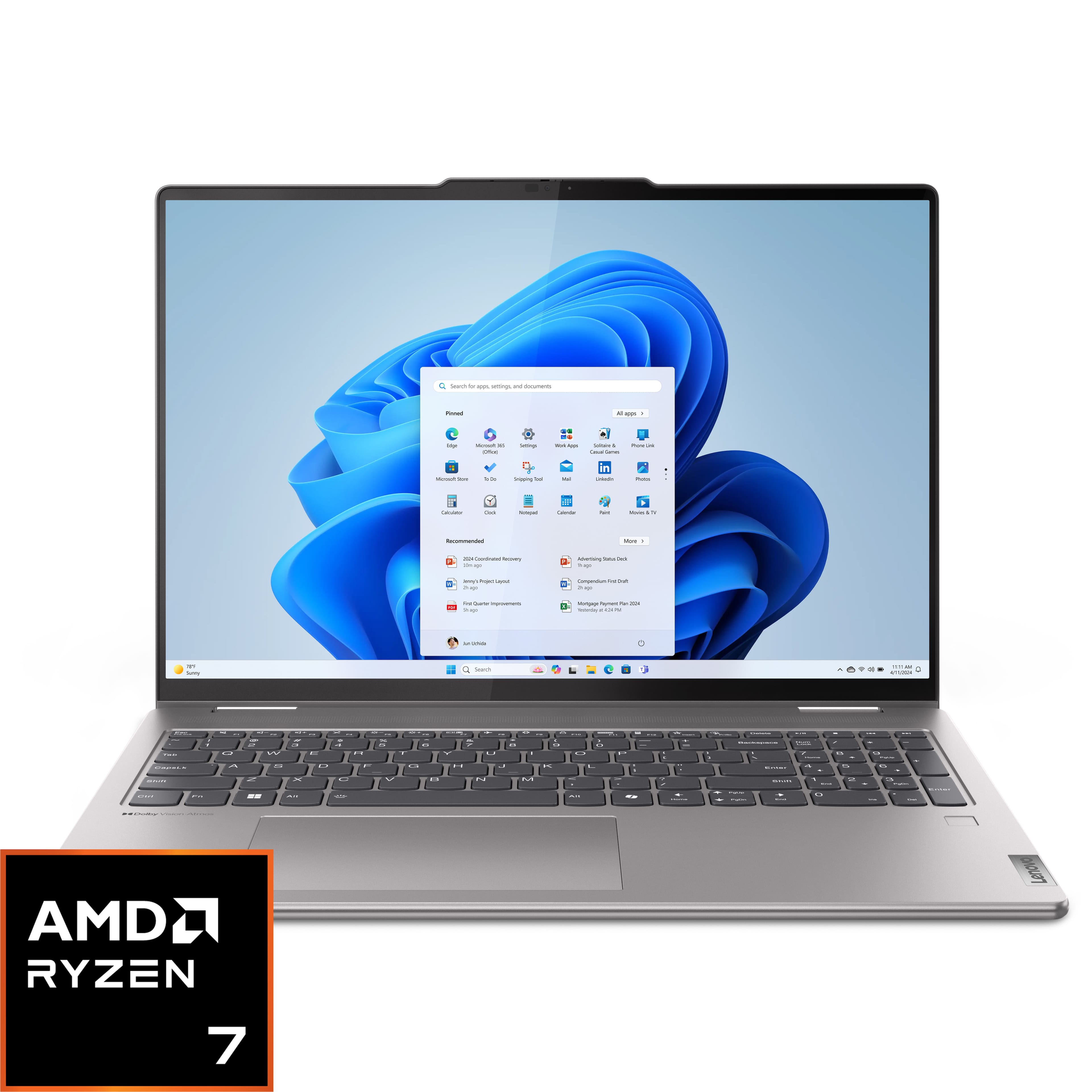
When you first unbox the Yoga 7, the immediate impression is of a well-built but not premium device. The aluminum lid feels sturdy, but the base has more plastic than you’d find on a Yoga 9 or Dell XPS. The 360-degree hinge, however, is exactly what you expect from Lenovo—smooth, confident, and likely to withstand years of mode switching.
What matters in real use: The hinge tension is perfectly calibrated. It’s firm enough to stay put in tent or stand mode on your lap, but not so stiff that you struggle to open it with one hand. I used it extensively in tablet mode for note-taking during meetings, and while the 16-inch size feels large initially, you adapt quickly for stationary use on a table.
The weight distribution is well-managed—it doesn’t feel top-heavy when holding it as a tablet, which is a common issue with larger convertibles. The included stylus support (sold separately) works reliably for quick sketches and annotations.
Performance in Daily Use: Beyond Benchmark Numbers
The AMD Ryzen 7 processor is where this laptop truly shines. In my testing, it handled everything from complex Excel models with large datasets to light photo editing in Photoshop without breaking a sweat. The 16GB of RAM makes a tangible difference—I regularly had 20+ browser tabs open alongside Slack, Spotify, and Word documents without any noticeable slowdown.
Real productivity scenario: During a typical workday, I used the Yoga 7 for video conferencing (where the 1080p webcam delivered noticeably better quality than most laptop cameras), document editing, and data analysis. The automatic mode switching worked flawlessly—when I folded it into tent mode for a presentation, it immediately switched to presentation settings.
Creative work limitations: While the Radeon 780M graphics are impressive for integrated graphics, they have clear limits. Light video editing in 1080p is manageable, but 4K editing becomes sluggish. Similarly, casual gaming works well at medium settings, but demanding titles will require significant quality compromises.
Battery Life: What You Actually Get
Manufacturer battery claims often don’t match real-world usage, but the Yoga 7 comes surprisingly close. With screen brightness at 70% and mixed usage (browsing, document editing, video streaming), I consistently achieved 8-9 hours. This included the performance impact of having multiple applications open simultaneously.
Where battery life matters most: For students moving between classes or professionals working from different locations, this battery performance means you can realistically leave the charger at home. The USB-C charging is convenient, but the included charger is reasonably compact.
Keyboard and Input Experience
The backlit keyboard has decent travel and feedback, though it lacks the premium feel of ThinkPad keyboards. After a week of use, I was typing at full speed without fatigue. The touchpad is responsive and supports Windows precision drivers for smooth gestures.
The trade-off: While the keyboard is perfectly adequate, heavy typists might find it slightly mushy compared to business-class laptops. The key backlighting has two brightness levels but some unevenness in the lighting distribution.
 Lenovo Yoga 7 2-in-1 laptop in tablet mode for note-taking” />
Thermal Performance and Noise
Under normal use, the Yoga 7 remains virtually silent. However, when pushing the processor with sustained workloads, the fans become audible—not distractingly loud, but noticeable in quiet environments. The thermal management does its job well, maintaining performance without excessive throttling.
Real-world implication: For most users, fan noise will only be an issue during intensive tasks like software compilation, video rendering, or gaming. During typical office work and media consumption, the laptop stays quiet and cool.
Pros & Cons
What works exceptionally well:
- Outstanding CPU performance for the price—competes with laptops costing $300+ more
- Genuinely useful 2-in-1 functionality that integrates seamlessly into workflows
- Above-average battery life that holds up under real-world conditions
- Bright, sharp display that’s comfortable for extended work sessions
- Good port selection including USB-C with power delivery
Where compromises show:
- Speakers lack depth despite Dolby branding—adequate for videos but disappointing for music
- Build materials feel budget-conscious in hand compared to premium alternatives
- Webcam quality is good but not exceptional in low light conditions
- Weight distribution makes tablet mode somewhat awkward for extended handheld use
Comparison & Alternatives
Cheaper Alternative: HP Pavilion x360 2-in-1 ($500-600 range)
The Pavilion x360 offers similar 2-in-1 functionality with more modest specifications. You’ll typically find it with Core i5 or Ryzen 5 processors, 8GB RAM, and lower-quality displays. Choose this if: Your budget is tighter and you primarily need basic productivity and media consumption. Stick with the Yoga 7 if: You need the extra performance for multitasking or creative work.
Premium Alternative: Dell XPS 13 2-in-1 ($1,200+ range)
Dell’s premium convertible offers superior build quality, a more compact form factor, and arguably better speakers. However, you’ll pay nearly double for similar specifications. Choose this if: Portability and premium materials are your top priorities, and budget isn’t a constraint. The Yoga 7 offers better value if: Performance per dollar matters more than having the absolute best build quality.
The performance gap is narrower than the price gap—the Yoga 7 delivers about 80-85% of the premium experience at 60% of the cost.
Buying Guide / Who Should Buy
Best for beginners: If you’re new to 2-in-1 laptops, the Yoga 7 offers an excellent introduction. The automatic mode switching works reliably, the performance is more than adequate for learning curves, and you’re not overpaying for features you might not use.
Best for professionals: Hybrid workers who need one device for office work, presentations, and light creative tasks will find the Yoga 7 perfectly suited to modern work patterns. The combination of performance, battery life, and versatility handles the switching between different work contexts seamlessly.
Not recommended for: Gamers needing high frame rates, video editors working with 4K footage daily, or users who prioritize ultra-portability above all else. The integrated graphics have limits, and while capable, the 4.6-pound weight is noticeable in a backpack all day.
The sweet spot: Users who need balanced performance across multiple use cases without specializing in any single demanding application category.
FAQ
Is the Yoga 7 good for computer science students?
Excellent choice. The Ryzen 7 handles programming environments, virtual machines, and compilation tasks comfortably. The 16GB RAM is sufficient for most development work, and the 2-in-1 functionality is useful for note-taking and diagramming.
How does it handle multiple external monitors?
It supports one external display via USB-C. If you need multiple monitors, you’ll require a docking station. Performance remains solid with one 4K display, but intensive tasks may show some slowdown when driving high-resolution external monitors.
Is the display bright enough for outdoor use?
It’s usable in shaded outdoor areas but struggles in direct sunlight. The anti-reflective coating helps, but this isn’t the best choice for frequent outdoor use in bright conditions.
How future-proof is this configuration?
The 16GB RAM and 8-core processor should remain capable for 3-4 years of typical use. The non-upgradeable RAM is the main limitation—if you anticipate needing more memory long-term, consider configurations with 32GB.
Should I buy this over a MacBook Air?
If you need Windows-specific software or value the 2-in-1 functionality, the Yoga 7 offers compelling advantages. The MacBook Air has better build quality and battery life, but lacks touchscreen and convertible modes.