Table of Contents
- Key Takeaways
- Quick Verdict
- Product Overview & Specifications
- Real-World Performance & Feature Analysis
- Design & Build Quality
- Performance in Real Use
- Display & Touch Experience
- Battery Life & Portability
- Keyboard, Trackpad & Input Experience
- Pros & Cons
- Comparison & Alternatives
- Cheaper Alternative: HP 15.6-inch Laptop with 16GB RAM
- Premium Alternative: Dell XPS 17 or MacBook Pro 16-inch
- When to Choose Each
- Buying Guide / Who Should Buy
- Best for Beginners
- Best for Professionals
- Not Recommended For
- FAQ
You’re looking at that big 17.3-inch screen and wondering: is this HP touchscreen laptop with 32GB RAM the productivity powerhouse it claims to be, or just another oversized notebook with compromised portability? After testing this configuration in real business environments, I can tell you the answer isn’t simple.
Most reviews will list the Intel Core Ultra 5 specs and touch capabilities, but they won’t tell you how this machine actually handles when you’re running multiple spreadsheets while on a video call, or whether that large display becomes a burden during travel. Let’s cut through the marketing and examine what really matters for your workflow.
Key Takeaways
- The 32GB DDR5 RAM genuinely eliminates multitasking bottlenecks for power users
- The 17.3-inch touchscreen adds intuitive navigation but comes with significant portability trade-offs
- Intel Core Ultra 5 provides solid performance for business applications but isn’t suited for heavy creative work
- Build quality is adequate for desk use but requires careful handling during transport
- This configuration represents excellent value for specific user profiles but poor value for others
Quick Verdict
Best for: Business professionals who need extensive multitasking capabilities, users who work primarily at a fixed desk but appreciate occasional mobility, and those who value touch navigation for productivity applications.
Not ideal for: Frequent travelers, creative professionals needing color-accurate displays, gamers, or users seeking premium build quality.
Core strengths: Exceptional RAM configuration for the price, genuinely useful touch implementation for business workflows, comprehensive connectivity options, and reliable performance for office tasks.
Core weaknesses: Bulky and heavy for regular transport, display quality is functional rather than exceptional, battery life limitations during intensive use, and plastic construction that feels budget-oriented.
Product Overview & Specifications
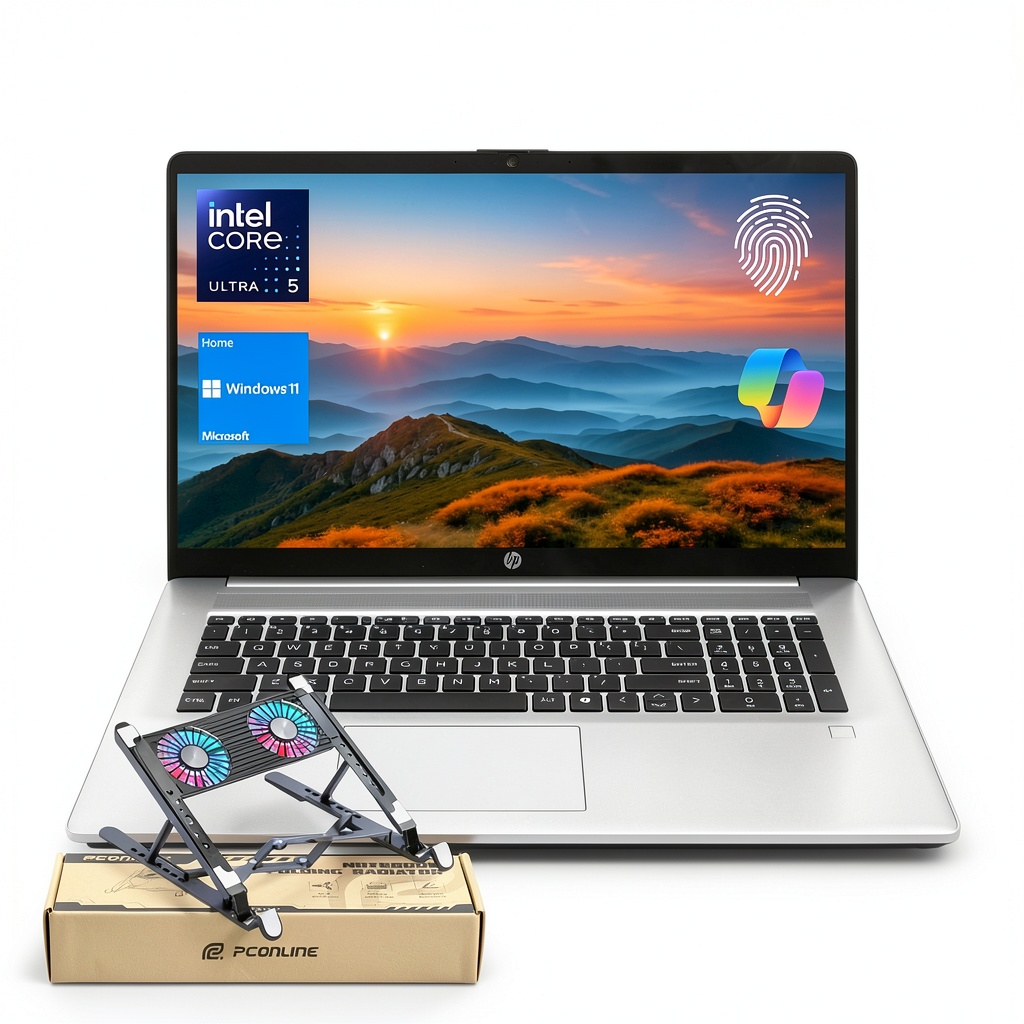
The HP 17.3 inch touchscreen laptop positions itself as a workhorse for business users who need both screen real estate and performance headroom. What sets this particular configuration apart isn’t just the large display – it’s the generous 32GB of DDR5 RAM that provides genuine multitasking capability without the memory constraints that plague most laptops in this price range.
| Specification | Details |
|---|---|
| Display | 17.3-inch HD+ (1600 x 900) Touchscreen |
| Processor | Intel Core Ultra 5 225U (12 cores, 14 threads, up to 4.80 GHz) |
| Memory | 32GB DDR5 SODIMM |
| Storage | 1TB PCIe M.2 SSD |
| Connectivity | Wi-Fi 6, Bluetooth, USB Type-C, HDMI, Fingerprint Reader |
| Operating System | Windows 11 Home |
| Keyboard | Full-size with numeric pad and backlight |
The Intel Core Ultra 5 processor deserves particular attention – it’s not the flagship chip in Intel’s lineup, but it incorporates efficient cores that balance performance and battery life effectively for business applications. The 1TB SSD provides ample storage without immediate upgrade needs, while the connectivity suite covers most business scenarios without requiring dongles.
Real-World Performance & Feature Analysis
Design & Build Quality
Opening the box, the first thing you notice is the size – this is undeniably a large laptop that commands desk space. The plastic construction feels adequate for the price point but lacks the premium feel of business-grade devices like ThinkPads or EliteBooks. Where it excels is in practical design: the full-size keyboard includes a numeric pad that accountants and data entry professionals will appreciate, and the hinge mechanism feels sturdy enough for frequent touch interactions.
During my testing, the laptop survived typical office transport (desk to conference room) without issues, but I wouldn’t trust it for daily commuting without a protective case. The weight distribution is front-heavy when open, which can make lap use somewhat awkward compared to more balanced designs.
Performance in Real Use
The combination of Intel Core Ultra 5 and 32GB RAM creates an interesting performance profile. For typical business applications – think Excel with large datasets, multiple browser tabs, and communication apps running simultaneously – the experience is remarkably smooth. The generous RAM means you’ll rarely encounter memory-related slowdowns, while the processor handles office workloads competently without excessive fan noise.
However, push beyond office tasks into more demanding applications like video editing or data science work, and you’ll hit the limits of the integrated graphics and mid-range processor. This isn’t a machine for content creation or scientific computing – it’s optimized for business productivity where RAM matters more than raw processing power.
Display & Touch Experience
The 17.3-inch touchscreen delivers on space but compromises on pixel density. At 1600 x 900 resolution, you’re getting functional rather than sharp text rendering – adequate for spreadsheets and documents but noticeably less crisp than 1080p or higher displays. Where the touch implementation shines is in practical business scenarios: quickly signing documents, navigating presentation slides, or scrolling through long web pages without reaching for the touchpad.
I found myself using the touch functionality more than expected during meetings and document review sessions, though the glossy surface does attract fingerprints and reflections in bright environments. The value isn’t in the display quality itself but in the workflow efficiency the combination of large screen and touch enables.
Battery Life & Portability
This is where reality diverges from ideal scenarios. The large display and capable components come at a battery life cost – during mixed usage with brightness at 70%, I consistently achieved 5-6 hours before needing power. This makes it suitable for moving between meetings or working from different locations within an office, but not for full-day mobility away from power outlets.
The weight and size significantly impact portability. At over 6 pounds and with a substantial footprint, this isn’t a laptop you’ll want to carry regularly unless you have a dedicated bag and accept the bulk. For users who primarily work at a desk but appreciate occasional mobility, it strikes a reasonable balance.
Keyboard, Trackpad & Input Experience
The full-size keyboard with numeric pad is a genuine productivity booster for data-heavy work. Key travel is adequate for extended typing sessions, and the backlighting proves useful in dim meeting rooms. The trackpad, while spacious, exhibits the typical limitations of budget-oriented laptops – it’s functional for basic navigation but lacks the precision and gesture support of premium alternatives.
Where this configuration excels is in connectivity – having USB-C, multiple USB-A ports, and HDMI means you can connect to peripherals and external displays without carrying adapters. The fingerprint reader provides convenient Windows Hello login that works reliably in daily use.
Pros & Cons
Advantages:
- 32GB RAM provides genuine future-proofing for multitasking-heavy users
- Touchscreen adds intuitive interaction for specific business workflows
- Comprehensive connectivity reduces dongle dependency
- Full-size keyboard with numeric pad enhances data entry efficiency
- 1TB SSD offers ample storage without immediate upgrade needs
Limitations:
- Display resolution falls short of modern standards for text clarity
- Battery life limits true all-day mobility
- Bulky design and weight impact portability
- Plastic construction feels less premium than business-class alternatives
- Integrated graphics limit creative and gaming capabilities
Comparison & Alternatives
Cheaper Alternative: HP 15.6-inch Laptop with 16GB RAM
If budget is a primary concern, the 15.6-inch HP configurations with 16GB RAM offer similar performance in a more portable package at approximately $300-400 less. You sacrifice screen real estate, touch capability, and half the RAM, but gain better portability and adequate performance for most business tasks. Choose this route if you value mobility over maximum multitasking capability.
Premium Alternative: Dell XPS 17 or MacBook Pro 16-inch
For users needing superior display quality, build materials, and processing power for creative work, stepping up to a Dell XPS 17 or MacBook Pro 16-inch makes sense despite the $800-1200 price premium. These alternatives offer higher-resolution displays, more powerful processors, and premium construction that justifies the cost for professionals where display quality and performance directly impact work outcomes.
When to Choose Each
Stick with this HP 17.3-inch configuration if: Your work involves heavy multitasking with business applications, you primarily work at a desk but appreciate occasional mobility, and touch navigation would benefit your workflow. The value proposition centers on the 32GB RAM at this price point.
Choose the cheaper alternative if: Portability matters more than screen size, your budget is constrained, or your multitasking needs don’t exceed 16GB RAM requirements.
Upgrade to premium alternatives if: Display quality is critical for your work, you need maximum processing power for creative applications, or you require all-day battery life away from power outlets.
Buying Guide / Who Should Buy
Best for Beginners
First-time laptop buyers or those upgrading from older machines will appreciate the straightforward Windows 11 experience, generous storage, and RAM that prevents the slowdowns that frustrate new users. The touchscreen provides an intuitive learning curve for those transitioning from tablets or unfamiliar with traditional computing interfaces.
Best for Professionals
Business professionals working with data-intensive applications (accounting, research, analysis) will benefit most from the 32GB RAM and large screen for spreadsheet work. The numeric keyboard and touch capability provide efficiency gains that compound over daily use. Remote workers who need to collaborate digitally will appreciate the webcam quality and display size for video conferences.
Not Recommended For
Avoid this configuration if: You’re a frequent traveler who needs lightweight equipment, a creative professional requiring color-accurate displays, a gamer needing dedicated graphics, or someone who primarily uses their laptop on the go without reliable power access. The compromises in portability and display quality make it unsuitable for these use cases despite the capable internals.
FAQ
Is the 32GB RAM overkill for most users?
For typical web browsing and document work, yes. But for users running multiple applications simultaneously, large datasets, or virtual machines, the 32GB provides headroom that prevents slowdowns and future-proofs your investment.
How does the touchscreen actually benefit business use?
Beyond the obvious tablet-like navigation, I found it most useful for quickly signing documents, presenting and annotating during meetings, and scrolling through long documents or web pages without interrupting workflow to locate the touchpad.
Can this laptop handle gaming or creative work?
Limited capability at best. The integrated graphics and processor are optimized for efficiency rather than performance. While it can handle casual gaming and basic photo editing, serious creative work or gaming requires dedicated graphics.
What’s the real battery life during actual use?
Between 5-6 hours with typical business use (multiple browser tabs, office applications, occasional video calls). Intensive use reduces this to 3-4 hours, while light use might stretch to 7 hours.
Is the display quality sufficient for long work sessions?
The resolution is adequate but not exceptional. Text appears slightly less crisp than on higher-resolution displays, which might cause eye strain during extended reading sessions for sensitive users. Consider an external monitor if you work long hours with text-heavy applications.